
Apple Watch
Install and use the Sparta Apple Watch companion.
Sparta ships with an Apple Watch app that pairs with the iPhone app. It mirrors what’s happening on the phone in real time and lets you drive your workout from your wrist. The watch app is part of Sparta Pro.
Installing
The watch app comes with the iPhone app. Once Sparta Fitness is on your iPhone, open the Watch app on the phone, scroll to Available Apps and tap Install next to Sparta Fitness. If automatic app installation is on, it’s already there.
You don’t sign in on the watch. It uses the account on your phone.
src/assets/screenshots/watch-overview-android.png Check-in screen
Open the app and tap Check In. Today counts as an active day. If you already checked in through any other path, the phone app, a finished workout or an imported run, the watch shows that and won’t count you twice.
Start Workout lists your templates. Pick one and the session starts on the phone with the watch following along.
Live workout control
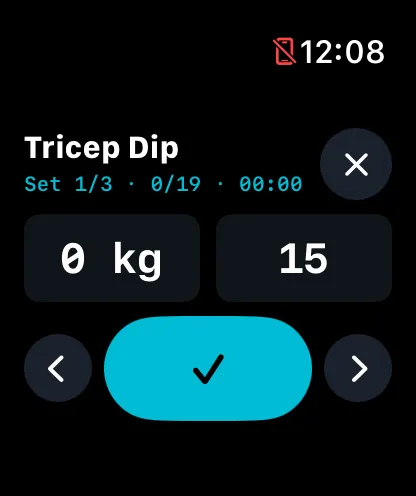
When your phone has an active session, the watch shows the current exercise and set. From the wrist you can:
- Adjust weight, reps or duration for the current set. Weight uses the Digital Crown in 0.1 kg steps.
- Complete a set. The phone decides whether rest follows.
- Start the work timer for duration sets.
- Adjust or skip the rest timer.
- Move to the next or previous exercise.
- Add an extra set to the current exercise.
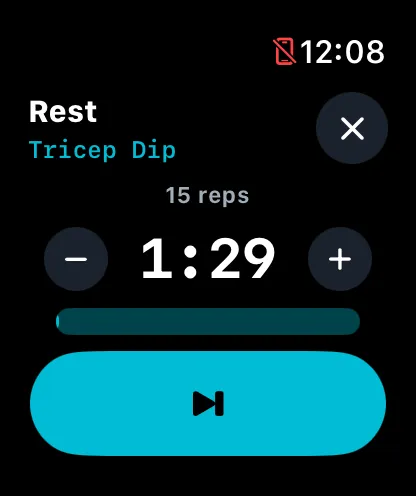
src/assets/screenshots/watch-rest-android.png The rest countdown ticks on the watch itself, so a brief dropout in the connection never freezes it. When rest is over, the watch taps your wrist.
Smart Stack
While a workout is running, a Sparta widget sits in the Smart Stack with the elapsed time or the rest countdown. Tap it to jump back into the app. Outside a workout it shows today’s check-in state.
When it doesn’t work
- “Can’t reach phone.” The watch and phone aren’t connected. Bring the phone closer or open the phone app.
- The watch is stuck on an old workout state. The watch only knows what the phone last told it. Open the phone app to force a refresh.
The watch is a remote control for the phone. History, leaderboards, settings and sign-in stay on the phone.